Plan for the worst, hope for the best. That is our starting point for a festival livestream. The aim is to agree what happens when the running order changes, a feed disappears or the online audience cannot reach the programme, while there is still time to prepare.
A useful festival livestream brief connects editorial decisions with technical responsibilities. It explains what viewers will watch, which content is cleared, who supplies each feed and what the team should do if the intended route becomes unavailable.
Decide what the online audience will watch
A continuous performance stream, selected stage coverage and a presenter led programme create different workloads. Decide which you are making before discussing camera numbers. Specify platforms, transmission times, languages, captions and whether access is public or restricted.
Think beyond the stage feed. Interviews, backstage conversations and highlights can give the online programme its own shape, but they need a place in the production plan. Agree who will speak, where they can be recorded and who will bring them to the crew. Check permissions before allocating an interview slot, rather than finding a willing contributor and discovering afterwards that the footage cannot be used.
If highlights need to appear later that day, work backwards from the intended release time. Allow for transferring recordings, choosing material, editing, checking sound and obtaining approval. Name one person who can approve the finished piece. A camera crew cannot cover a performance and an interview elsewhere at the same moment, so identify overlapping commitments before confirming the schedule.
Write a short description of the viewing experience. What should someone see between performances? Who introduces a change? What remains useful if an artist cannot be shown?
Make permissions part of production planning
Give one named person responsibility for confirming permitted performances, platforms, territories, replay availability and later clips with the relevant rights holders. Keep that information accessible to the production team and update it when the programme changes.
Platform readiness needs its own check. YouTube’s copyright guidance warns that licensed material can still interrupt a livestream if the relevant content owner has not added the channel to its Content ID allowlist.
Allowlisting does not replace permission or guarantee uninterrupted delivery. Agree who will coordinate any required action with the rights holder. Prepare cleared holding material for gaps in coverage, and confirm current licensing requirements directly with PRS for Music and the relevant rights holders. Do not assume that permission for the physical event covers every proposed online use.
Assign ownership of every shared feed
Festival production often brings together stage sound, venue screens, cameras, graphics, streaming and recording teams. List what each team supplies, where the handover occurs and who can approve a change.
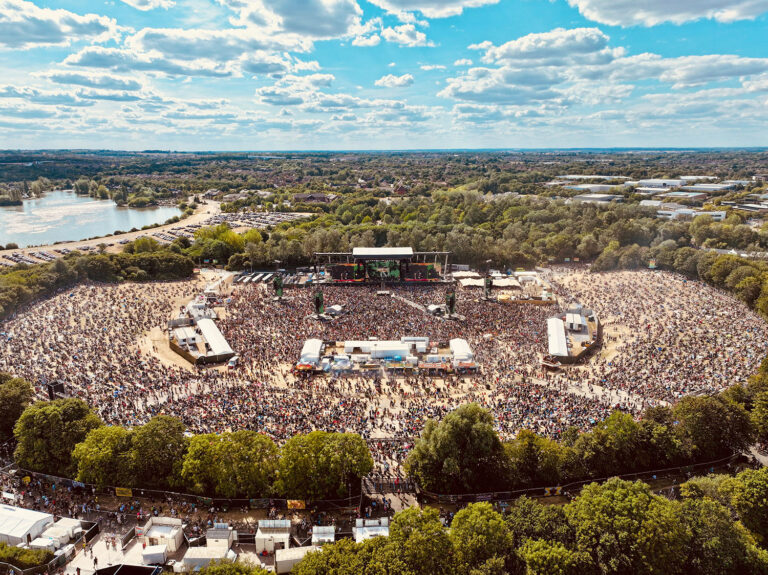
At Reggae Land and Zimfest, we produced the online livestream with dwmedia. At Reggae Land, 22live provided the main stage audio. PRG provided the video wall and cameras. Shared camera feeds supported a separately directed online programme.
The distinction matters. Access to a camera feed does not mean the online team controls the camera. Agree available shots, signal formats, communication and tally, the indication that a camera is being used. Record who resolves conflicting requests when venue screens and the online programme need different pictures.
Give sound its own conversation
Ask what audio the stream will receive and who will monitor it. A feed balanced for the people standing in front of the stage may need different treatment for people listening at home.
For our Reggae Land production, dedicated video and broadcast sound trailers gave the teams separate working spaces. The online audio mix was created on a DiGiCo Quantum 326. That was the approach for this production, not a minimum equipment requirement for every festival.
The organiser’s brief should identify the broadcast sound handover, the engineer responsible, required audience atmosphere and the route for urgent communication. Resolve those questions with the sound team during planning, while the system and staffing can still be adapted.
Treat connectivity as managed infrastructure
Share the site plan, access arrangements, power provision and proposed production positions. Identify who supplies the outgoing connection, who else shares it and who monitors its performance. A speed test is one observation, not a complete delivery plan.
Ask for connection checks at the proposed production position, not just at the site office. Where mobile networks form part of the plan, discuss which networks are available, how they will be tested and what may change once the audience arrives. Several connections can offer useful options, but they should not be treated as a promise that every interruption is covered.
Decide which traffic takes priority. The outgoing programme should not have to compete unexpectedly with guest WiFi, large recording uploads or another production team transferring files. Agree who controls access and when less urgent transfers can happen. Keep the streaming requirements visible when the wider site network is being planned.
Name the person who will monitor delivery throughout the show. Their checks should include the outgoing stream and what a viewer can actually see and hear at the destination. Agree how a deteriorating connection will be reported, who can authorise a switch and what viewers will see while the team responds. That makes our principle of planning for the worst a set of decisions people can act on.
YouTube recommends allowing upload capacity for primary and backup streams plus 20% headroom. That is platform guidance, not a universal festival specification or reliability guarantee. Ask your production team to size the connection for the actual settings and other traffic, and explain which risks the backup route addresses.
Write the fallback plan in plain language
For each important failure, record the warning sign, the person making the decision, the action and what viewers will experience. Useful scenarios include a missing camera, lost stage sound, an unavailable artist, an encoder fault and a failed outgoing connection.
A second device is only useful if the team knows how to use it and understands what it shares with the first. Ask whether both routes depend on the same power, network equipment or access point. The answer should inform the plan, without turning every event into the largest possible technical package.
Prepare approved holding graphics, audience messages and a communication route to the organiser. Agree when to continue with reduced coverage, switch content or pause transmission. Our wider festival production experience shows why the method must adapt to the programme and site.
Rehearse the complete route
Schedule a test that reaches the actual viewing destination, including sound, moving pictures and any access restrictions. Have someone outside the production network check the player. Test the agreed fallback under controlled conditions before the public transmission.
YouTube’s streaming guidance recommends checking encoder failover, local recordings, watch pages and mobile access, then monitoring sound and pictures throughout the stream. Build those checks into named duties. Do not treat the platform’s encoder preparation timings as the full rigging schedule for a festival.
Agree the handover after the show
Specify programme recordings, any individual camera recordings, file delivery, edit requirements and the person approving release. Separate live permission from replay and clip decisions. Decide who gathers the platform reports and how results will be described.
Views, reach and unique viewers are different measurements. Record the platform, period and definition alongside each figure. There is no need to compress them into one impressive looking total.
Before confirming the live streaming plan, check that the brief names the programme owner, permissions contact, feed owners, sound lead, network lead, test slot, fallback decision maker and recording recipient.
Planning for the worst means making those decisions while people have time to think. Hoping for the best is easier when everyone knows what they will do if the plan changes.